Google Moves Local Services Ads to Performance Max
The Local Services Ads migration to Performance Max is one of the biggest changes to local advertising Google has made in years, and if you run ads for a home service, local trade, or lead-generation business, it’s worth understanding before your account gets moved automatically.
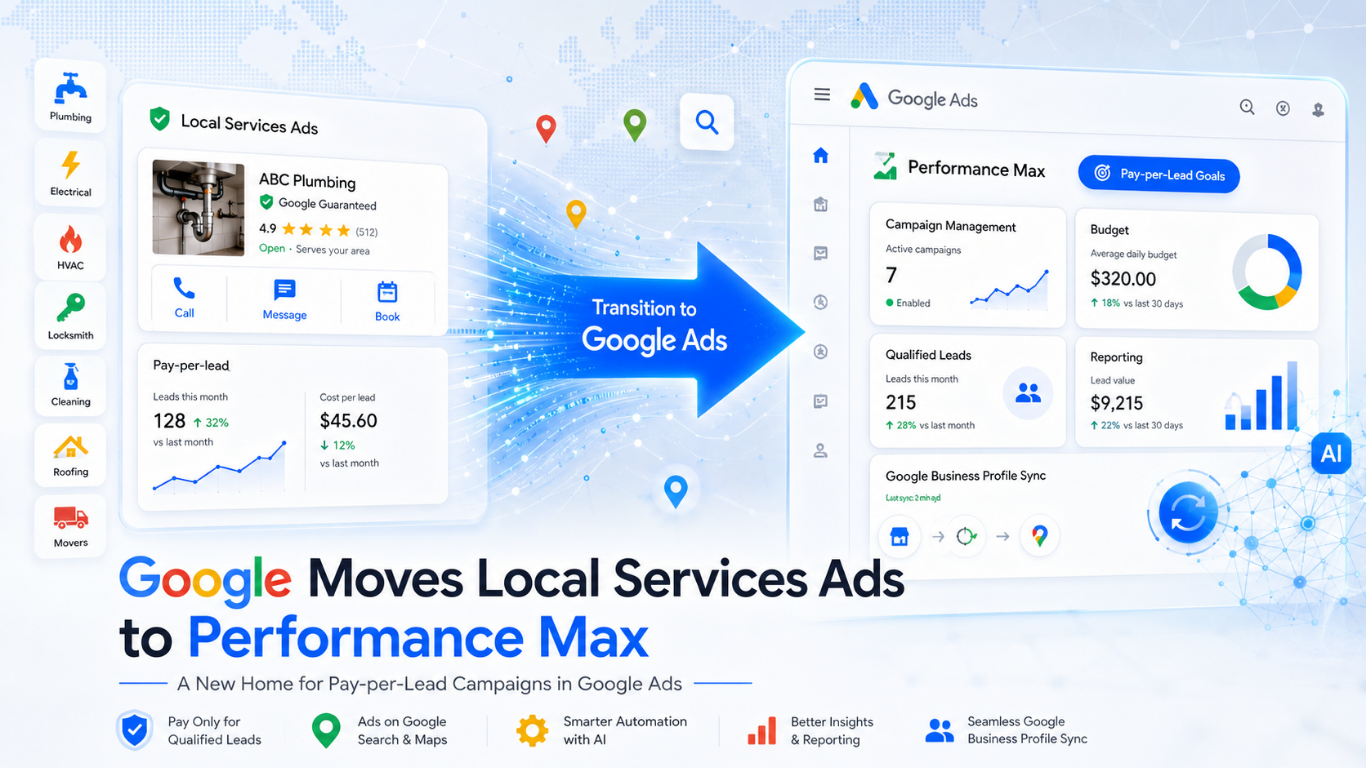
For years, Local Services Ads (LSAs) lived in their own separate dashboard, completely apart from the rest of Google Ads. That’s now changing. Google is transitioning Local Services Ads into a specialized Performance Max campaign type built specifically for pay-per-lead goals, meaning your local ads, budgets, and leads will soon live inside the same platform you already use for Search or Shopping campaigns.
This matters because the transition isn’t optional; if you currently run Local Services Ads, your account will be migrated on Google’s schedule, not yours. Understanding what’s changing, what’s staying the same, and how the new bidding and budget rules work will help you avoid surprises and keep your lead flow steady through the switch.
In this guide, we’ll walk through exactly what the Local Services Ads migration to Performance Max means for your account, the rollout timeline, and what UAE and GCC businesses running local lead campaigns should know as this change extends internationally.
What Is the Local Services Ads Migration to Performance Max?
Google Local Services Ads is transitioning to a more integrated, self-service experience inside the Google Ads platform. This allows advertisers to manage all their Google advertising in one unified platform while keeping the pay-per-lead model they already rely on. Over the coming months, existing Local Services Ads campaigns will be automatically migrated to a specialized Performance Max campaign type optimized specifically for pay-per-lead goals.
While the platform used to manage advertising is changing, where and how ads appear to local customers on Google Search and Google Maps remains exactly the same.
It’s worth being precise about the terminology here, as Google explains in its official documentation: this new format is called “Performance Max campaigns with pay-per-lead goals,” not a rebrand of Local Services Ads under a new product name. The Local Services Ads dashboard is being retired, and its functionality is being absorbed into this specific Performance Max campaign type.
How Performance Max Campaigns With Pay-Per-Lead Goals Differ From Standard Performance Max
This is not the same as a typical Performance Max campaign advertisers may already be running for Search, Shopping, or Display. According to Google, the two differ in several important ways:
- What you pay for. With pay-per-lead goals, you only pay for valid, qualified leads, such as phone calls, message leads, or bookings, rather than standard ad clicks. Standard Performance Max campaigns operate on a cost-per-click model, charging you whenever someone clicks your ad, regardless of whether they contact your business.
- Where ads appear. Campaigns with pay-per-lead goals serve strictly on Google Search and Google Maps. Standard Performance Max campaigns serve across all Google ad networks, including YouTube, Gmail, and the Google Display Network.
- No keyword management. Campaigns with pay-per-lead goals are completely keywordless, relying on information from your Google Business Profile instead of manual keyword lists.
- Google Verified badge. Eligible businesses in select verticals can display the Google Verified badge on their profile page after passing required business registration and representative checks.
- Simplified onboarding. Onboarding for pay-per-lead campaigns is simpler and doesn’t require manual account linking, inputting business information, or setting up complex bidding strategies. Because of this, certain standard Performance Max features, assets, and optimization practices don’t apply.
What’s Not Changing With This Migration
If you already run Local Services Ads, the core mechanics of your account stay the same:
- Pay-per-lead model. You still only pay for valid leads, such as phone calls and messages, rather than ad clicks.
- Performance focus. The focus on high-intent customer connections is unchanged.
- Ad placements. Your ads will continue to show exclusively on Google Search and Google Maps, in the same positions as before.
- Keywordless targeting. Your campaign remains keywordless, with targeting based on the service categories and areas you offer, along with your other settings.
What’s Changing With This Migration
- A new home integrated with Ads. You’ll manage budgets, adjust targeting settings and reply to customer inquiries directly from the Google Ads platform instead of the separate Local Services Ads dashboard. Previous performance reports won’t carry over, so it’s worth backing up your historical data before migrating.
- Bidding and budget adjustments. To align with Google Ads bidding models, manual bidding and industry-level Target CPA are being deprecated.
- Self-service campaign changes. You gain greater control over your local campaigns. In Google Ads, you can edit the phone number your call and message leads are routed to in real time. Core business details, such as your business name and physical address, must be updated on your Google Business Profile and will sync automatically to Google Ads.
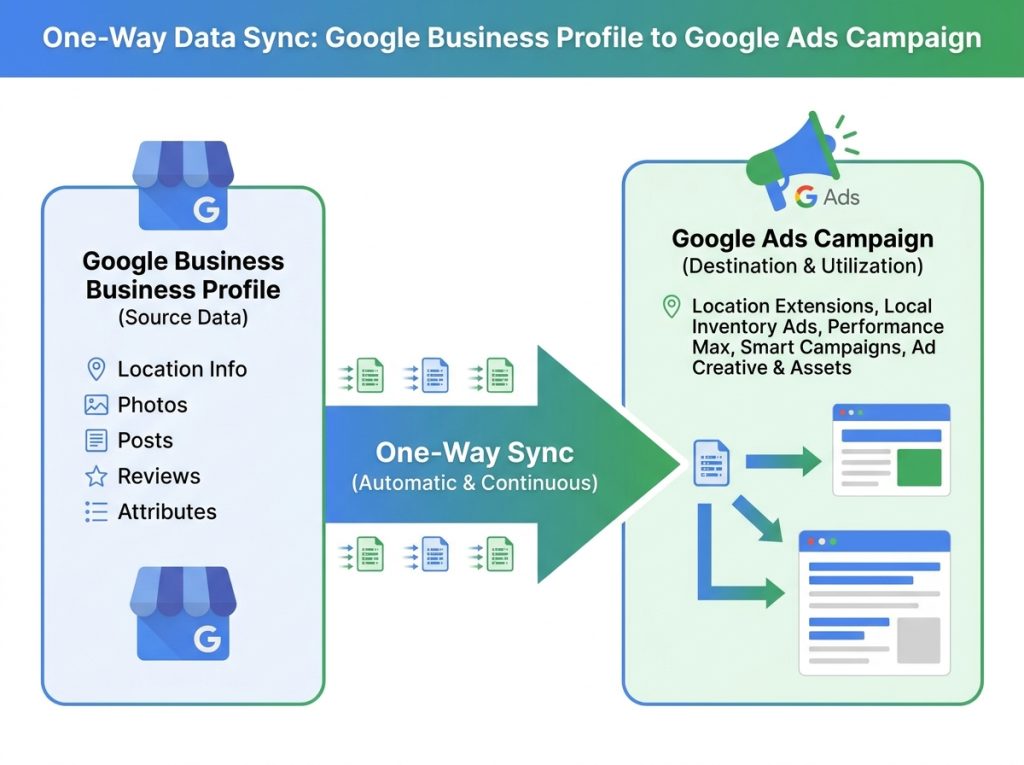
- Google Business Profile integration. Google Ads pre-populates your campaign setup using details from your Google Business Profile. Your business name, address and hours sync in one direction from your profile to Google Ads. While core details sync automatically, significant updates to your business name or physical address will trigger a standard verification review, which typically takes 24 to 48 hours and may temporarily pause your campaign. Other fields, such as photos and service areas, are pre-populated but can be customized independently.
- BBB callouts deprecation. Better Business Bureau callouts are no longer supported. To help your business stand out on Google Search, you’ll want to select at least six other structured callouts from your campaign’s assets tab, such as business hours, specialties, or accepted payment methods.
Migration Timeline: Who Moves and When
Rather than migrating all accounts at once, Google is transitioning businesses in a phased approach:
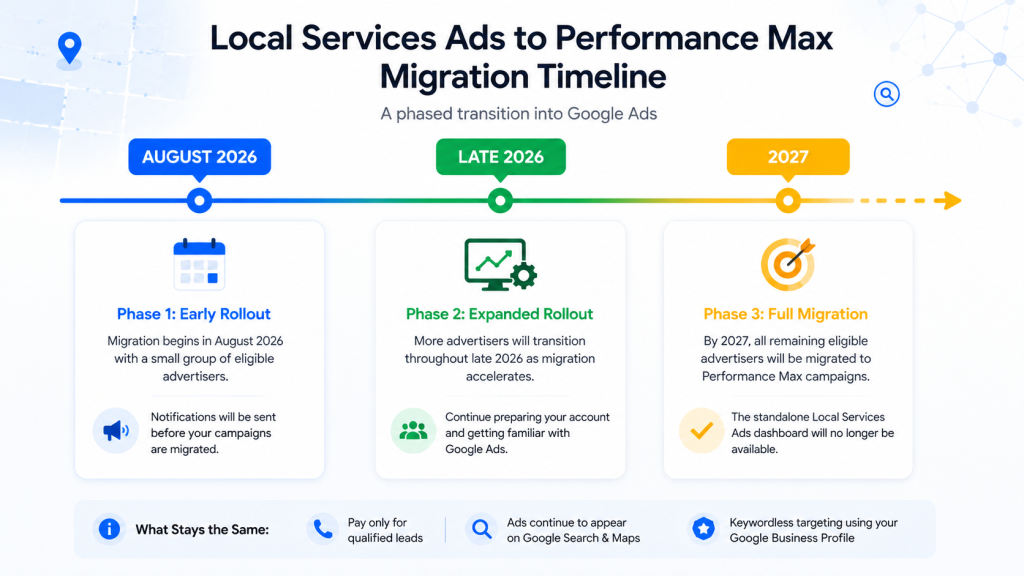
- August 2026: The first phase begins for select home and storefront service advertisers in the United States, including plumbing, HVAC, electrical, appliance repair, house cleaning, lawn care, roofing, pest control, and moving.
- Late 2026: The migration expands to broader advertiser groups, including service-area businesses without physical storefronts and accounts with custom bidding or booking configurations.
- 2027: Non-U.S. accounts and all remaining business categories not migrated in 2026, will migrate.
This phased approach means UAE and other non-U.S. advertisers currently running Local Services Ads have a longer runway before migration, but the underlying account and bidding changes described here will still apply once their turn comes.
What to Expect During Migration
Google automates the migration process so campaigns undergo minimal downtime. A few things to keep in mind ahead of transition day:
- Advance email alerts. The account administrator receives an advance notification email 14 days before the migration date, along with warning banners inside the current dashboard. A final reminder email is sent 7 days later, and another email confirms once migration is complete.
- Automatic settings transfer. Targeted locations, service types, business categories, budget limits, ad schedule, and business photos all move over automatically without requiring manual input.
- Local Services Ads dashboard access ends. Once migrated, the original Local Services Ads dashboard is no longer accessible. Logging in on or after the migration day automatically redirects to the campaign overview in Google Ads. Previous performance reports are no longer accessible after this point.
- Verification status carries over. If business verification is already complete, the verified status and Google Verified badge transfer automatically. Insurance and license reverification are no longer required, though any additional business-level checks will trigger a notification in Google Ads.
- A short stabilization window. While many ads start running right away, it can take up to two weeks for the migration to fully complete and for campaign performance to ramp back to stable levels.
Bidding and Budget Adjustments
Bidding and budget management are adjusted to fit standard Google Ads bidding configurations. The following changes apply automatically on transition day:
- Weekly to daily budgets. Your historical average weekly budget is automatically divided by 7 to determine your daily average budget. This doesn’t affect your monthly spend, which is capped at your daily average budget multiplied by 30.4, the average number of days in a month. Daily spend may fluctuate on high-demand days, but monthly billing won’t exceed this limit.
- Deprecation of manual bidding. Manual bidding, such as setting a maximum cost-per-lead, is no longer supported in Google Ads.
- Deprecation of vertical-level Target CPA. Google Ads doesn’t support vertical-level Target CPA bidding. If you previously managed different Target CPA amounts for separate verticals under a single campaign, a unified campaign-level Target CPA will be calculated and applied to all vertical categories instead. If you want to maintain separate bidding rules for different business categories, you can set up separate campaigns for each vertical, for example, creating separate campaigns for plumbing and HVAC.
Managing Your Campaigns in Google Ads
When logging into Google Ads for the first time after migration, it’s worth checking your settings to make sure everything is accurate. Key workflows to know:
- Viewing campaign performance. In the Google Ads campaign dashboard, you can view real-time performance data for your pay-per-lead campaigns. Focus on metrics like “Conversions” (total leads you’re charged for), “Cost” (total ad spend), and “Cost / conv.” (average cost-per-lead).
- Reviewing budgets and bidding targets. Navigate to the Settings tab within the Campaigns menu and select your pay-per-lead campaign to review your daily budget and adjust bidding targets.
- Reviewing targeting settings. In the same Settings tab, you can review your service areas, ad schedules, and business categories. These settings operate independently of your Google Business Profile once migration is complete, letting you customize ad targeting without changing your organic business details.
- Pausing and resuming ads. You can temporarily stop receiving leads at any time by navigating to the Settings tab, selecting your campaign, and toggling the campaign status between Paused and Enabled.
- Managing Google Business Profile details. Your business name, physical address and standard hours sync automatically in one direction from your Google Business Profile to Google Ads. To update these core details, you must edit them directly on your Google Business Profile. Other elements, like service areas and ad schedules, can be customized independently in Google Ads.
- Accessing Lead Manager. To check, download, or interact with your leads, navigate to the Goals dropdown, click Conversions, and select Leads. This table replaces the Local Services Ads lead inbox and keeps the charged status, lead type (call, message, etc.), lead feedback form and CRM export options you’re used to.
- Managing message leads. If message goals are active, clicking an individual lead opens a communication panel where you can read and reply to text messages or emails directly inside Google Ads.
- Managing ad assets. On the Assets page, you can upload up to 100 additional business photos and manage your business callouts, up to 6 per category. Standard Performance Max asset types, such as Headlines, Videos, and Sitelinks, don’t apply to campaigns with pay-per-lead goals.
Expert Insights on the Local Services Ads Migration to Performance Max
Best Practice: Export your Local Services Ads performance history before your scheduled migration date. Historical campaign-level performance metrics, including past impressions, clicks, weekly spend, and ad-level reports, won’t migrate automatically, so backing this up protects your ability to measure long-term ROI once the Local Services Ads migration to Performance Max reaches your account.
Common Mistake: Assuming your existing Target CPA setup will transfer cleanly if you’re running multiple verticals under one account. Since a single unified Target CPA applies per campaign after migration, businesses running several service categories with different cost targets should plan to split them into separate campaigns beforehand.
Professional Recommendation: Review your budget expectations ahead of time. Since weekly budgets convert to a daily average calculated by dividing by 7, spend patterns on your highest-demand days may look different even though your monthly total is unaffected.
Implementation Tip: Use the transition as a prompt to refresh your callout assets. With BBB callouts being deprecated in favor of at least six other structured callouts, this is a good moment to update business hours, specialties, and payment options so your profile looks complete from day one. If you’d rather have this handled for you, our Google Ads management team can prepare your account ahead of migration.
Emerging Trend: Moving Local Services Ads into a Performance Max campaign type reflects a broader industry direction: consolidating specialized ad products under fewer, more automated campaign types driven heavily by structured business data like Google Business Profile, rather than manual account setup.
Local UAE Perspective on the Local Services Ads Migration
While the first migration wave is limited to U.S. advertisers, this change is directly relevant to UAE and wider GCC businesses for a few reasons:
- Non-U.S. accounts are explicitly on the roadmap. Google has confirmed that non-U.S. accounts, along with any remaining business categories, will transition in 2027, giving UAE advertisers time to prepare rather than being caught off guard.
- Google Business Profile becomes even more central. Since campaign setup pre-populates directly from Google Business Profile details, UAE service businesses (contractors, cleaning companies, clinics, repair services, and similar local trades) should treat their Business Profile as a live extension of their ad account, not just a separate directory listing.
- Pay-per-lead remains attractive for competitive Dubai categories. In high-competition local sectors common across Dubai and the UAE, such as home maintenance, beauty and wellness, and specialized trades, paying only for valid leads rather than clicks continues to offer a more predictable cost structure than standard CPC campaigns.
- Bilingual Business Profile data matters more. Because ad setup pulls directly from your Google Business Profile, keeping business names, categories, hours, and photos accurate and up to date, in both English and Arabic where relevant, has a more direct impact on ad quality than before.
- Plan budgets in daily terms early. UAE advertisers currently thinking in weekly budget terms should start planning in daily-average terms now, since Google Ads budgets are structured around a daily average multiplied by 30.4 to determine the monthly cap, a different mental model than a simple weekly spend figure.
Frequently Asked Questions (FAQs)
1. What exactly is changing with Local Services Ads? Local Services Ads is transitioning into a specialized Performance Max campaign type built for pay-per-lead goals. The pricing model, ad placements and keywordless targeting stay the same; only the management platform is changing, moving from the standalone LSA dashboard into Google Ads.
2. How do I access my old performance reports after migration? Previous campaign-level performance metrics, such as past impressions, clicks, weekly spend, and ad-level reports, won’t migrate to Google Ads. You need to download or export your data from the original Local Services Ads dashboard before migrating, using the reporting steps in Google’s Local Services Ads help documentation.
3. What is the difference between daily and weekly budgets? Google Ads manages campaign spend using daily averages rather than weekly totals. Your historical average weekly budget is automatically divided by 7 to set your daily average budget. Your monthly spend is then capped at that daily average multiplied by 30.4, the average number of days in a month, so your total monthly cost won’t increase even though the budgeting unit changes.
4. How can I manage my leads in the new interface? You can check, download, and interact with leads by navigating to the Goals dropdown in Google Ads, clicking Conversions, and selecting Leads. This replaces the old Local Services Ads lead inbox and includes charged status, lead type, a feedback form, and the ability to export leads to your CRM.
5. Can I create a new pay-per-lead campaign directly in Google Ads right now? Not yet. New campaigns with pay-per-lead goals can’t currently be created directly within Google Ads. To set up additional campaigns or local accounts, continue using g.co/localservices until direct campaign creation becomes available.
6. Will my past customer leads carry over? Yes. Past customer lead history, including contact details, message threads, and call recordings, transfers automatically and remains fully accessible in the new Lead Manager interface.
7. What happens if my business details change on my Google Business Profile? Changes to business hours, phone number and minor name updates sync automatically within 24 hours. Significant updates to your business name, storefront address, or primary category require verification, which typically takes 24 to 48 hours and may temporarily pause your campaign.
8. When will this affect my account if I’m not in the first rollout group? It depends on your business type and location. The rollout begins in August 2026 with select U.S. home and storefront service categories, expands later in 2026 to service-area businesses and custom-configured accounts and reaches non-U.S. accounts and remaining categories in 2027.
Key Takeaways
- Local Services Ads is transitioning into a Performance Max campaign type built specifically for pay-per-lead goals, not into a new standalone product with its own brand name.
- Pay-per-lead pricing, Search/Maps-only placement, and keywordless targeting all stay the same.
- Historical performance reports do not migrate automatically; export them before your migration date.
- Manual bidding and vertical-level Target CPA are being retired in favor of standard Google Ads bidding structures.
- Weekly budgets convert to daily averages, with monthly spend capped at the daily average multiplied by 30.4.
- Google Business Profile becomes the primary data source for campaign setup, making profile accuracy directly tied to ad performance.
- The rollout is phased: U.S. home-service categories from August 2026, broader U.S. accounts later in 2026, and non-U.S. accounts (including the UAE) in 2027.
Preparing for the Local Services Ads Migration to Performance Max
This shift is less about reinventing how local lead generation works and more about consolidating it into a single, more automated platform. The pay-per-lead pricing, Search and Maps placements and keywordless targeting that made Local Services Ads effective for local service businesses aren’t going anywhere. What is changing is where you manage everything, how your budgets and bidding are structured and how closely your Google Business Profile now ties into your ad performance.
For UAE and GCC businesses, the 2027 timeline means there’s time to prepare, but the smartest move is to start now: clean up your Google Business Profile, think through your bidding structure if you run multiple service categories and get comfortable with daily-average budgeting before it becomes mandatory.
If you’d like help auditing your current local ad setup or preparing your account ahead of the Local Services Ads migration to Performance Max, the team at 2CG can walk you through what this means for your specific campaigns. Explore our Google Ads and PPC services or get in touch directly below.
Get in touch with 2CG:
2CG – Web Development & Digital Marketing Agency (Dubai)
- Email: hello@2cguae.com
- Phone: +971505878691 / +971525392930
- WhatsApp: +971505878691 / +971525392930
- Landline: +97142506490