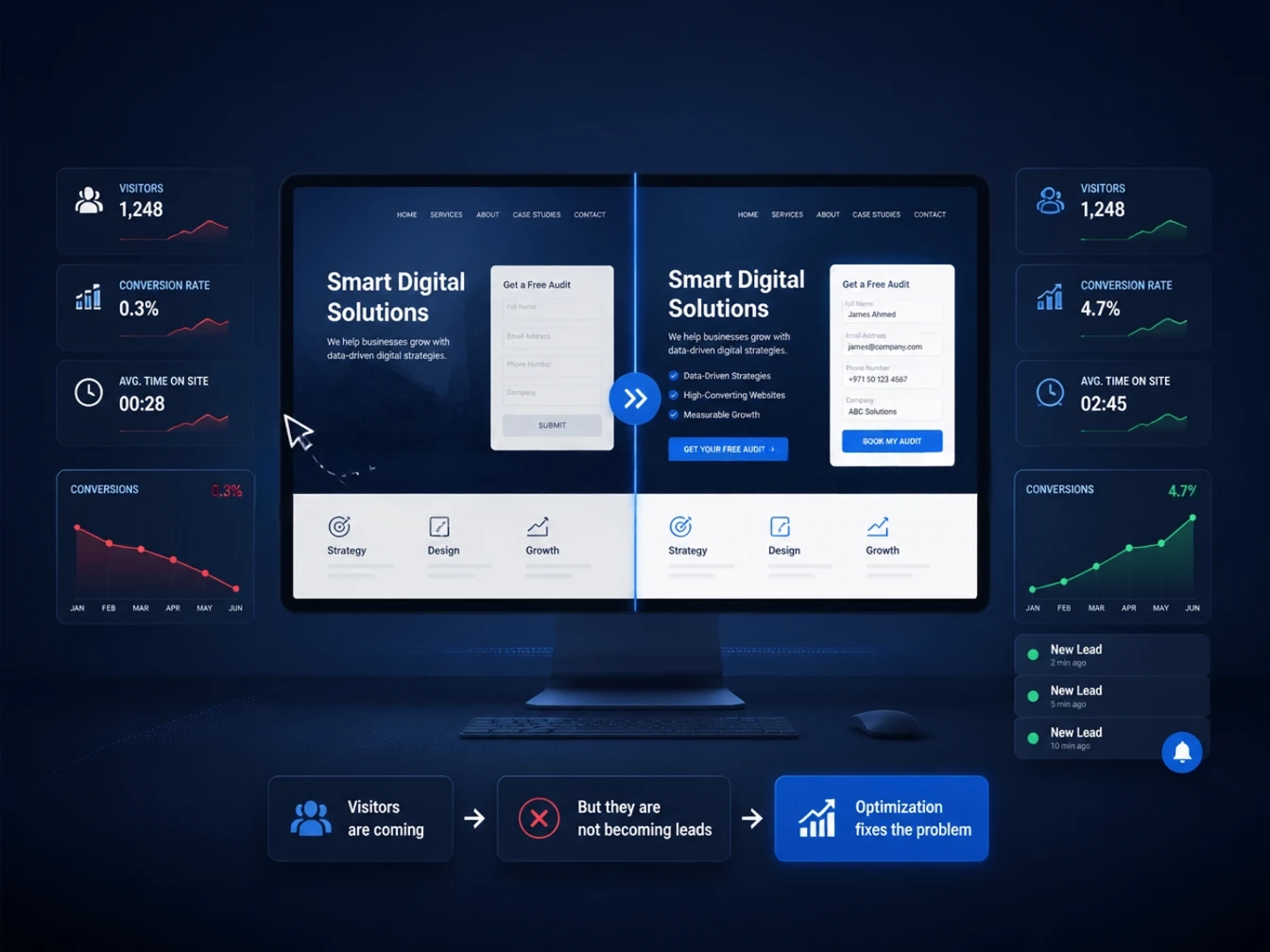
If your website is not generating leads, the instinctive response is usually to assume you need more traffic. In reality, a lot of businesses already have enough visitors, they just aren’t converting them into inquiries, calls, or form submissions. More traffic to a website with the wrong problem just means more people leaving without taking action.
This is a genuinely common situation. A website can look professional, rank reasonably well and still fail to generate a meaningful number of leads, because the actual barriers are usually smaller and more fixable than businesses assume: an unclear call-to-action, a slow-loading page, a contact form that asks for too much, or messaging that doesn’t quite answer the visitor’s real question.
This guide walks through the 10 most common reasons a website not generating leads can underperform and what to actually do about each one. Rather than generic advice to “improve your website,” each problem here comes with a specific, actionable fix you can start applying right away.
10 Common Problems and Fixes
1. There’s No Clear Call-to-Action
The problem: Many websites bury their call-to-action inside a busy header, use vague labels like “Learn More” instead of a specific action, or expect visitors to hunt for a contact page. If a visitor has to think about what to do next, most of them simply leave instead.
The fix: Every key page should have one obvious, specific call-to-action, “Get a Free Quote,” “Book a Consultation,” “Request a Demo,” rather than a generic label. Repeat that same CTA at the top of the page, again after key content sections and once more at the bottom, so visitors are never more than a scroll away from taking action.
2. Your Website Is Too Slow
The problem: Slow-loading pages are one of the most common, and most underestimated, reasons for lost leads. Every additional second a page takes to load increases the likelihood a visitor leaves before it even finishes rendering, especially on mobile connections.
The fix: Run your key landing pages through Google PageSpeed Insights and address the biggest issues first, usually unoptimized images, unnecessary scripts, or slow hosting. Image compression and proper hosting alone often resolve a large share of typical speed problems without needing a full rebuild.
3. Your Navigation Is Confusing
The problem: If visitors can’t quickly find the service, product, or information they came for, they don’t dig deeper, they leave. Overly complex menus, unclear category names, or too many competing options in the navigation bar all add friction at exactly the moment a visitor is deciding whether to stay.
The fix: Simplify your main navigation down to the handful of paths visitors actually need: what you offer, how to contact you, and enough proof of credibility to trust you. If a menu item requires explanation, it’s probably not clear enough as written.
4. Your Site Isn’t Properly Optimized for Mobile
The problem: A site that technically resizes on a phone isn’t the same as a site that’s genuinely built for mobile use. Tiny tap targets, forms that are painful to fill out on a small screen, or text that requires zooming all quietly push mobile visitors away, and mobile is where a large share of your traffic likely comes from.
The fix: Test your actual contact and lead forms on a real phone, not just the layout. If filling out your own form on your own phone feels frustrating, your visitors are almost certainly abandoning it at a similar rate.
5. Your Messaging Doesn’t Answer “Why You”
The problem: Many websites describe what a business does without explaining why a visitor should choose them specifically over the several other options they’re likely also considering. Generic messaging like “quality service” or “trusted by many” doesn’t differentiate you from any competitor saying the exact same thing.
The fix: Lead with a specific, concrete value proposition on your homepage and key service pages: what you actually do differently, for whom, and with what outcome. Specificity builds more trust than broad claims, and it gives visitors an actual reason to choose you.
6. Your Website Is Getting the Wrong Traffic
The problem: If your website is not generating leads, the problem may not be conversion at all. Sometimes the real issue is targeting. If your SEO or ad campaigns are bringing in visitors whose intent doesn’t match what you actually offer, no amount of on-page optimization will turn them into leads, because they were never the right audience in the first place.
The fix: Review your top-performing pages in analytics and check whether the keywords or ads driving traffic actually match your services and target customer. Traffic volume that doesn’t convert is often a sign of a mismatch between what’s being promised in search or ads and what the page actually delivers.
7. There Are No Trust Signals
The problem: Visitors researching a business online are naturally cautious, especially before submitting personal information or requesting a quote. A website with no testimonials, case studies, certifications, or recognizable client logos gives a hesitant visitor no reason to feel confident taking that next step.
The fix: Add specific, credible trust signals near your calls-to-action: real client testimonials, relevant certifications, notable client logos, or links to detailed case studies. Specificity matters here too: a testimonial with a name, company, and result is far more convincing than a vague, anonymous quote.
8. Your Contact Forms Are Too Long or Broken
The problem: Every additional field on a contact form is another small reason for a visitor to abandon it. Asking for a phone number, company size, budget range, and a detailed message all before a first conversation often costs more leads than it qualifies. Beyond form length, simple technical issues, like a broken submit button or a form that silently fails, can quietly cost leads for weeks before anyone notices.
The fix: Strip your primary contact form down to only what you genuinely need for a first response, usually name, email, and a brief message. Test your own form regularly to confirm submissions are actually reaching your inbox or CRM as expected.
9. You’re Only Offering One Way to Convert
The problem: Not every visitor is ready to book a call or request a quote on their first visit. If “Contact Us” is the only option available, you’re likely losing visitors who would have engaged with a lower-commitment step first, like downloading a guide, requesting a free audit, or starting a chat.
The fix: Offer at least one lower-friction conversion option alongside your primary CTA: a free resource, a short assessment, or a live chat widget, so visitors who aren’t ready for a full inquiry still have a way to stay engaged with your business.
10. You’re Not Tracking What’s Actually Happening
The problem: Without proper analytics and conversion tracking in place, it’s genuinely difficult to know which of the above nine problems is actually costing you leads. Businesses often guess at fixes based on assumptions rather than data, which wastes time addressing issues that weren’t actually the real problem.
The fix: Make sure analytics and conversion tracking are properly set up on every key page and form, not just installed once and forgotten. Reviewing where visitors drop off, which pages have the highest exit rates, and which traffic sources actually convert gives you a clear, evidence-based starting point instead of a guess.
For measurement and conversion analysis, Google Analytics can help you understand how visitors interact with your website and where conversion opportunities may be getting lost.
Expert Insights
Best Practice: Fix one or two issues at a time and measure the impact before moving to the next. Changing five things simultaneously makes it impossible to know which change actually improved your conversion rate.
Common Mistake: Assuming a lead generation problem is always a traffic problem. In many cases, a business generates enough traffic already, and the real issue is friction somewhere between arrival and conversion.
Professional Recommendation: Look at your website the way a first-time visitor would, ideally by watching a real person unfamiliar with your business try to complete your primary call-to-action. Problems that are invisible to you after months of familiarity are often immediately obvious to someone seeing the site for the first time.
Implementation Tip: Set up simple heatmap or session recording tools alongside standard analytics. Watching how real visitors actually scroll, click, and abandon your pages often reveals friction points that raw traffic numbers alone don’t show.
Emerging Trend: As more research and comparison shopping happens through AI assistants and social platforms before a visitor ever reaches your website, first-visit trust signals and clarity matter even more, since that visitor may already have compared you to competitors before landing on your site at all.
Local UAE Perspective
A few factors are worth considering specifically for UAE and Dubai-based businesses whose website is not generating leads:
- Bilingual visitors need a bilingual experience. If a meaningful share of your audience searches or browses in Arabic, an English-only site, or one with a poorly translated Arabic version, creates friction that pure design fixes won’t solve.
- Mobile matters even more locally. With mobile usage particularly high across the UAE, a website that performs even slightly worse on mobile than desktop is likely losing a disproportionate share of potential leads.
- WhatsApp is often the preferred contact method. Many UAE customers prefer messaging over filling out a form. If your only conversion option is a traditional contact form, adding a visible WhatsApp click-to-chat option can meaningfully reduce friction for local visitors.
- Trust signals should reflect local credibility. UAE-specific trust signals, business licensing information, local client logos, and Google reviews tied to your Google Business Profile often reassure local visitors more effectively than generic international testimonials alone. You can use Google Business Profile to manage your business presence and reviews across Google.
- Seasonal and cultural timing affects lead flow. Genuine drops in leads during Ramadan, public holidays, or peak summer travel periods are often timing-related rather than a sign something is broken on the website itself, worth factoring in before assuming a technical problem.
Frequently Asked Questions
It’s rarely just one thing, but unclear calls-to-action, slow load times, and overly long contact forms are among the most common and most fixable causes. Reviewing analytics for where visitors actually drop off is the fastest way to narrow down the real cause on your specific site.
2. How do I know if it’s a traffic problem or a conversion problem?
Check whether your traffic is relevant to what you offer. If visitors are arriving via keywords or ads that match your services but still aren’t converting, it’s more likely a conversion problem on the page itself rather than a traffic quality issue.
3. Should I redesign my whole website, or fix specific issues first?
Start with specific fixes. A full redesign is expensive and doesn’t guarantee better conversions if the underlying issues, weak messaging, poor CTAs, and slow speed, aren’t specifically addressed as part of that redesign.
4. How long should a contact form be?
As short as possible while still capturing what you genuinely need for a first response, typically just name, email, and a brief message. Additional qualifying questions can usually wait for a follow-up conversation rather than the first form.
5. Does page speed really affect lead generation that much?
Yes. Slower load times are consistently linked to higher visitor drop-off, particularly on mobile connections, which directly reduces the number of visitors who stick around long enough to convert.
6. What’s a reasonable first step if I don’t know where to start?
Set up or review your analytics and conversion tracking first. Without visibility into where visitors are actually dropping off, any fix you make afterward is a guess rather than an informed decision.
7. Can adding more trust signals really make a measurable difference?
Yes, particularly for businesses where the purchase or inquiry decision involves some risk or commitment. Specific, credible trust signals, named testimonials, real case studies, and recognizable client logos, reduce the hesitation that often stops a visitor from converting.
8. How often should I review my website for these issues?
A quarterly review is a reasonable baseline for most businesses, checking analytics, testing forms, and reviewing page speed, with a deeper review any time you notice a meaningful drop in leads.
Key Takeaways
- A website not generating leads is rarely caused by a single issue; it’s usually a combination of smaller friction points across the visitor journey.
- Unclear calls-to-action, slow load times, and overly long contact forms are among the most common and most fixable problems.
- More traffic won’t fix a conversion problem, and can sometimes mask one by making the issue harder to notice.
- Proper analytics and conversion tracking are essential for diagnosing the real cause rather than guessing.
- UAE-specific factors, bilingual support, mobile experience, and WhatsApp as a contact option can meaningfully affect local lead generation.
- Fixing one or two issues at a time, and measuring the result, gives a far clearer picture than changing everything at once.
A website that isn’t generating leads usually isn’t broken in one dramatic way, it’s losing small percentages of visitors at several different points along the way: a slow load here, an unclear CTA there, a contact form that asks for too much. Individually, each of these feels minor. Together, they can be the difference between a website that quietly sits online and one that actually drives your business forward.
The good news is that most of the 10 problems covered here are genuinely fixable without a full rebuild. Start with your analytics, identify where visitors are actually dropping off, and work through the fixes that match what you find.
If you’d like a second set of eyes on why your website isn’t converting, the team at 2CG UAE can run a practical audit across these exact areas and help you prioritize what to fix first. Explore our web development and services overview, SEO services, or reach out directly below.
Get in touch with 2CG:
2CG – Web Development & Digital Marketing Agency (Dubai)
- Email: hello@2cguae.com
- Phone: +971505878691 / +971525392930
- WhatsApp: +971505878691 / +971525392930
- Landline: +97142506490